Python Quick Start for Linux Admin
Why Python?
- Easy to learn and write
- REPL, can be used interactively
- Powerful built-in data types
- Strings, integers, floats
- List, tuple,set, dictionary
- Object-Oriented
- Many pre-defined classes
- Batteries Included
- Huge library of moduels
- Many more in your distro’s repo
- Huge number at Python package index pypi.python.org


ipython
- ipython3 is REPL+Shell
- sudo apt-get install ipython3
>>>automagic # to turn off, after this u need to give % befor every command
>>>%automagic to turn on
>>>alias findmysyslinks ls -l /etc/ | grep '^l'
>>>run example.py
>>>command(?) will give help
>>>import xyz # to get all modules of xyx just give xyz. and tab
Managing file system with Module
- import os is used to provie a common interface to both Linux and Windows


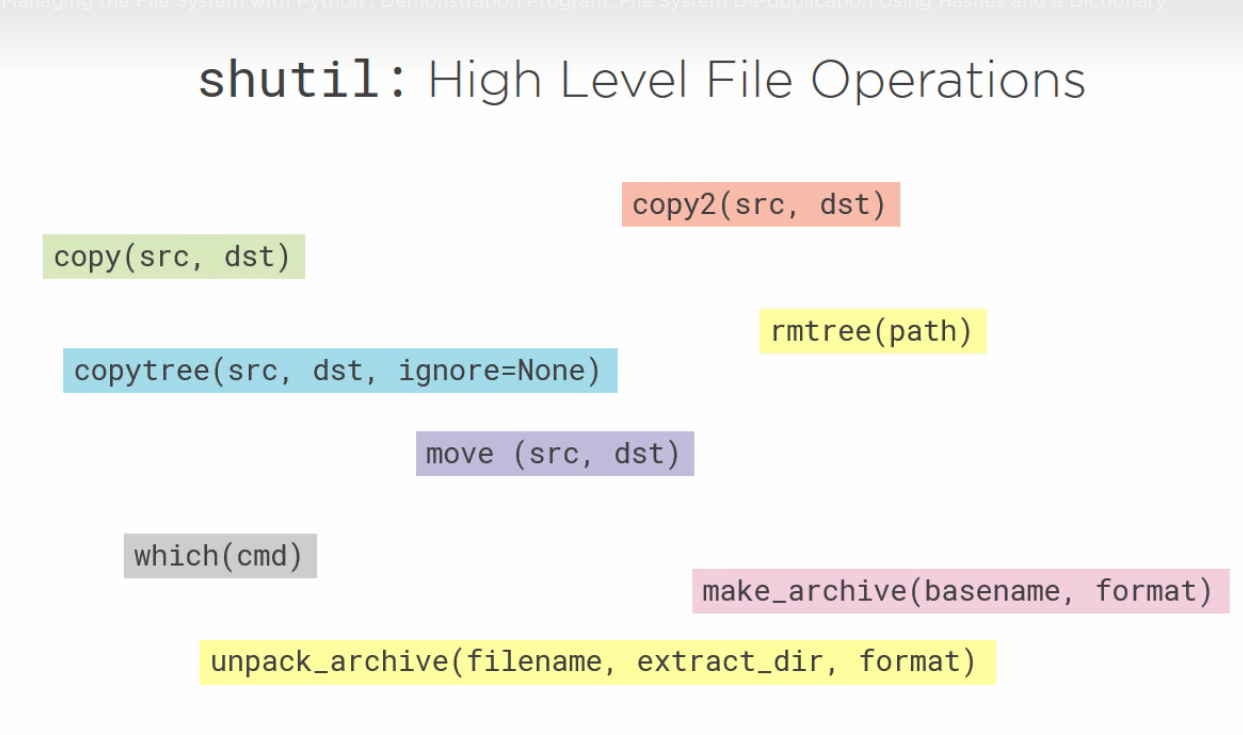
Interacting with Linux System


Command Line Arguments

optparse
argparse
import argparse

# https://docs.python.org/3/library/argparse.html#module-argparse

parser = argparse.ArgumentParser(description="Process Some integers")
parser.add_argument('integer',
                    metavar='N',  # Optional DISPLAY name , seen in help
                    type=int,
                    nargs='+',  # 1 to n arguments can be passed to integer since it doesn't have -- or - you can give arguments directly
                    help="an integer for an accumulator")
parser.add_argument("--sum",
                    metavar="Sum/max",
                    dest='accumulate',
                    action='store_const',
                    const=sum,
                    default=max,
                    help="sum the integers(default find max)")
args = parser.parse_args()
print(args.accumulate(args.integer))
Accessing the Environment
>>> import os
>>> os.environ
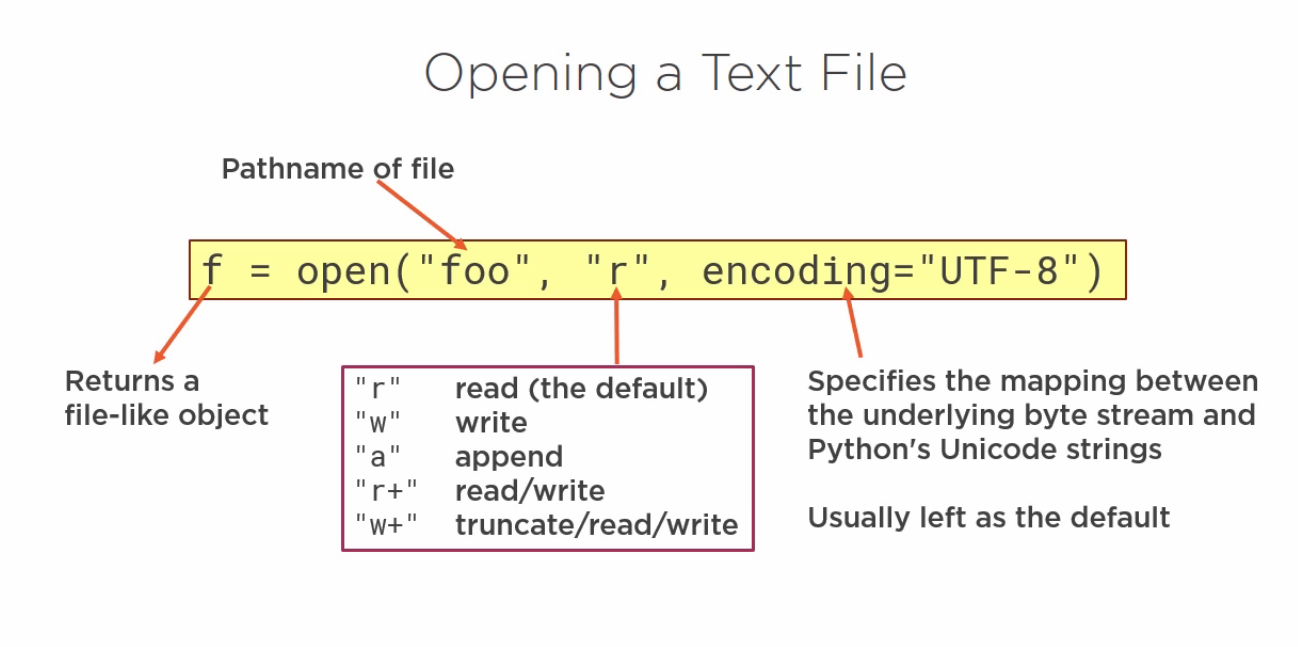
Files Streams and Filters

import sys

print("This is standard output written on stdout")

print("this is written to stderr", file=sys.stderr)

f = open("out1", "w")
print("This is written out1", file=f)
f.close()

with open("out2", "w") as f:
    print("this is written to out2", file=f)

with open("out3", "w") as f:
    sys.stdout = f
    print("This is written in out3")
Simple Python program to reverse line by either giving n text files or giving input from command prompt. uses sys.argv and python slicing
import sys

version = 2

if version == 1:  # Boring Loop
    def revline(line):
        outline = ''
        index = len(line)
        while index:
            index -= 1
            outline += line(index)
        print(outline, end='')

if version == 2:  # recursive loop
    def revline(line):
        if line:
            revline(line[1:])
            print(line[0], end='')

if version == 3:  # Pythonic slicing
    def revline(line):
        print(line[::-1], end='')


def process_code(f):
    for line in f:
        revline(line)


if (len(sys.argv)) == 1:
    process_code(sys.stdin)
else:
    for path in sys.argv[1:]:
        try:
            with open(path, "r") as file:
                process_code(file)
        except Exception as e:
            print("Got an exception:{}".format(e), file=sys.stderr)
Signals
Term = Terminate core = create cores

# time out using sigalarm

import sys
from signal import *


def timeout_handler(signum, frame):  # standard signal method, signumber and frame is signal frame(?)
    raise IOError("User not responding")


def get_name():
    signal(SIGALRM, timeout_handler)  # signal method name
    alarm(5)
    n = sys.stdin.readline()
    alarm(0)
    return n


signal(SIGINT, SIG_IGN)  # CNTRL+Z IGNORED
print("enter your name: ", end='')
sys.stdout.flush()
try:
    name = get_name()
except IOError:
    print("You did not reply, I will call you sleepy")
    name = 'Sleepy'

print("hello {}".format(name))
Combining Python with other tools
String vs Byte Objects
- Python String is a sequence of unicode characters
- Textual data in Linux is a sequence of bytes
- Everything stored in computer is in the form of bytes
- There are about 256 symbols which have a direct SINGLE byte for them, what about other languages?
- Use two bytes, but that was not enough
- Assign charcters to code points(integers) 1.1M code points, 110k assigned
https://stackoverflow.com/questions/10060411/byte-string-vs-unicode-string-python
>>> a = "foo"
>>> type(a)
<class 'str'>
>>> a = b'foo'
>>> type(a)
<class 'bytes'>
>>> a = r'foo'
>>> type(a)
<class 'str'>
>>> a = b'foo'
>>> type(a)
<class 'bytes'>
>>> a.decode()
'foo'
>>> type(a)
<class 'bytes'>
>>> a = a.decode()
>>> type(a)
<class 'str'>
>>> a = 'foo'
>>> type(a)
<class 'str'>
>>> a = a.encode()
>>> type(a)
<class 'bytes'>
Subprocess
#Demonstrating subprocess printing files > 10k bytes

from subprocess import Popen, PIPE

lister = Popen(["ls", "-l"], stdout=PIPE)

for bytes in lister.stdout:
    line = bytes.decode()
    if line.startswith("total"):
        continue
    spline = line.split()
    if int(spline[4]) > 1000:
        print(spline[8])
Mail

Sample Program to check disk space in AIX /u01 folder
#! /scs/bin/python3
import subprocess
import argparse
import time

parser = argparse.ArgumentParser()
parser.add_argument('--threshold', '-t', type=int, default=50)
parser.add_argument('--repeat', '-r', action="store_true", default=False)
args = parser.parse_args()

threshold = 50  # default threshold percentage
partition = "/u01"  # default partition

df = subprocess.Popen(["df", "-g"], stdout=subprocess.PIPE)


for line in df.stdout:
    # split into space seperated fields
    splitline = line.split()
    u = splitline[6]
    if u.decode() == partition:
        while True:
            if int(splitline[3][:-1]) > args.threshold:
                print("Warning!, size of /u01 greater than {}%".format(args.threshold))
            if args.repeat:
                time.sleep(5)
            else:
                exit(0)
Open a Tar archive
>>> import tarfile
>>> import os
>>> t = tarfile.open("test.tar","w")
>>> for file in ["out1","out2","out3"]:
...     t.add(file)
...
>>> t.close()
>>> exit()
>>> t = tarfile.open("test.tar")
>>> t.getnames()
['out1', 'out2', 'out3']
>>> t.extractall()
# Simple tar program
import sys
import tarfile

if len(sys.argv) > 2:
    list = ["."] # if not files are passed it will archive the directory
else:
    list = sys.arv[1:]

with tarfile.open("temptar.tar", "w") as t:
    for file in list:
        t.add(file)
Manipulating Strings in Python
- Python string is IMMUTABLE sequence of unicode charcters
format
# Example of specifying field width precision

import math

x = 1
for i in range(10):
    x = x * 2
    y = math.sqrt(x)
    print("{0:4}{1:10}{2:10.4f}".format(i, x, y))
String Test

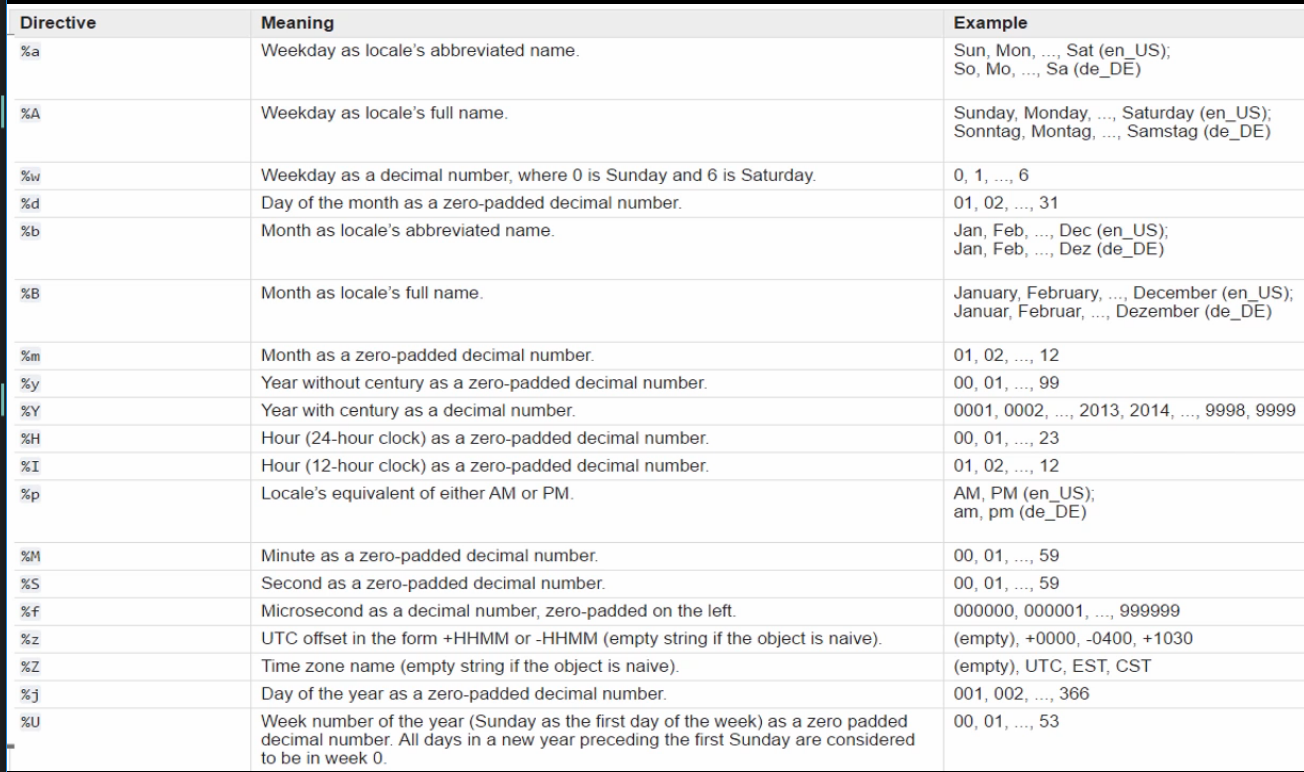
Date time
# What day you were born on?

from datetime import datetime

line = input("Enter your DOB in DD/MM/YY format: ")
birthday = datetime.strptime(line, "%d/%m/%Y")
print("You were born on {0:%A}".format(birthday))
Regular Expression
- Used for Input Validation as above, searching and Text substitution
>>> import re
>>> d3 = re.compile(r"[0-9]{3,}") # compiling
>>> re.search(d3, "abc1234xyz")
<_sre.SRE_Match object; span=(3, 7), match='1234'>
>>> re.search(d3, "abc12xyz")
Substituting US to UK dates
>>> import re
>>> convertDate = re.compile(r"(\d\d)-(\d\d)-(\d{4})")
>>> us_dates = "11-24-1997, 03-01-2018, 06-28-2010"
>>> uk_dates = re.sub(convertDate, r"\2-\1-\3", us_dates)
>>> uk_dates
'24-11-1997, 01-03-2018, 28-06-2010'
>>> uk_dates = re.sub(convertDate, r"\2-\1-\3", us_dates, count=2)
>>> uk_dates
'24-11-1997, 01-03-2018, 06-28-2010'
Processing Files
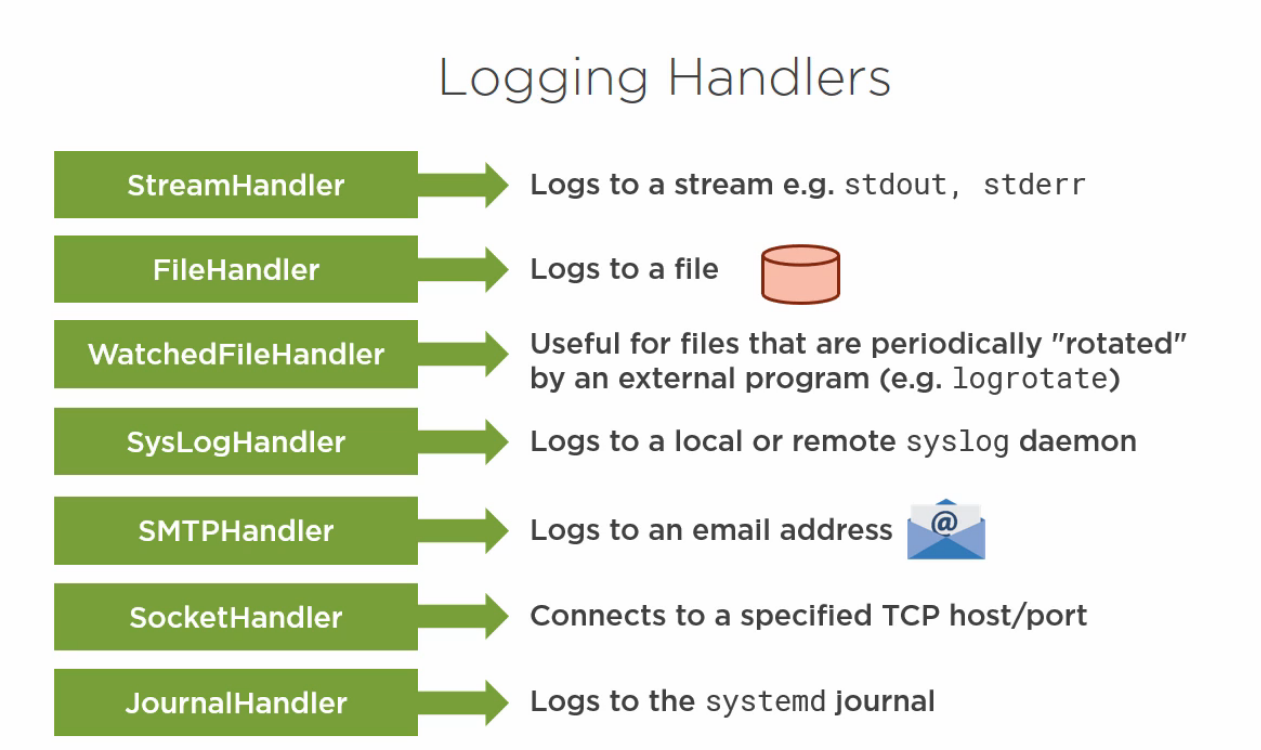
Logging
- Long running background services require logging to file, syslog or systemd journal



>>> import logging
WARNING:root:Somethin's wrong?
>>> logging.info("some info") # By default logging level is Warning. To change it exit out of repl and type belo
>>> import logging
>>> logging.basicConfig(level = logging.DEBUG, format = "%(levelname)s, %(asctime)s, %(message)s")
>>> logging.warning("this is warning")
WARNING, 2018-08-20 07:30:38,893, this is warning
>>> logging.info("works?")
INFO, 2018-08-20 07:31:07,840, works?
Logging DMO using systemd, standard for Linux
To read from Journal use Journalctcl | tail
# Logging Demo

import logging
from systemd.journal import JournalHandler  # Preferred Logging Method - 1 import

# Logging to a file

logging.basicConfig(filename="LogDmo.log", level=logging.DEBUG,
                    format="%(levelname)s %(asctime)s %(message)s")

logging.info("Log Started")

# Logging to systemd journal - 7 steps process
# This can be done with 3 steps. 3, 6, 7. Declare Handler, add handler to log, and write log

jlogger = logging.getLogger("journal-logger")  # 2 log name
jhandler = JournalHandler()  # 3 create handler
jformatter = logging.Formatter(fmt="%(levelname)s %(message)s")  # 4 create formatter
jhandler.setFormatter(jformatter)  # 5 update handler with formatter

jlogger.addHandler(jhandler)  # 6 update logger with handler
jlogger.warning("This is warning sent to the Journal")  # 7 write to log


# To stop updating log LogDmo.log as the above will be written there as well

jlogger.propagate = False
jlogger.warning("warning ONLY the Journal")

# Printing the stack trace with exception handler


def bad_idea():
    try:
        1 / 0
    except:
        logging.error("Failed to divide", exc_info=True)


bad_idea()
Processing an Apache Log
# use log and counting x

import collections

hist = collections.defaultdict(int)  # This is same as dict but will call a int value 0 whenever the key is not available

with open("xyz.log") as file:
    for line in file:
        url = line.split()[6].split('?')[0]
        hist[url] += 1  # regular dict fails at his step if new url is not assigned to 1 already

for url in sorted(hist, key=hist.get, reverse=True):
    if hist[url] < 50:  # ignoring small entries
        break
    print("{0:-40s}: {1:6d}".format(url, hist[url]))
Automatic Updates to /etc/fstab
# Program to replace device names in /etc/fstab

import re
from subprocess import Popen, PIPE

regex = re.compile(r"(/dev/sd[ab][1-9])(.*)")

outfile = open("fstab.out",mode="w")

for line in open("fstab.in"):
    match = re.search(regex, line)
    if match:
        print("Need to replace {}".format(match.group(1)))
        lsblk = Popen(["lsblk","-n","--output","UIUD",match.group(1)],stdout=PIPE)
        uiud = lsblk.stdout.readline().decode()
        replacement = "UIUD=" + uuid[:-1] + re.sub(regex, r"\2",line)
        print("replacement line is {}".format(replacement))
        print(replacement, end='', file=outfile)
    else: # copy the line through unchanged
        print(line, end='', file=outfile)

outfile.close()
pathlib
https://github.com/snth/pyconza17/blob/master/slides.md
>>> from pathlib import Path
>>> p = Path('.')
>>> p
WindowsPath('.')
>>> p.absolute()
WindowsPath('C:/Users/asyed/Documents/Book/PythonBeyondBasics')
>>> str(p.absolute())
'C:\\Users\\as\\Documents\\Book\\PythonBeyondBasics'
>>> p.absolute().as_uri()
'file:///C:/Users/as/Documents/Book/PythonBeyondBasics'
>>> p.absolute().as_posix()
'C:/Users/asyed/Documents/Book/PythonBeyondBasics'
>>> [x for x in p.iterdir() if x.is_dir()]
[WindowsPath('.git'), WindowsPath('img')]
>>> [str(x) for x in p.iterdir() if x.is_dir()]
>>> [str(x) for x in p.iterdir() if x.is_file()]
['BeyondFunctions.md', 'OrganizingLayerPrograms.md', 'prerequisites.md', 'PythonLinuxAdmin.md', 'README.md']
SysAdmin Course - Linux Academy
Setting up Centios Server
yum is a package management tools it is used to install softwares easily
yum updateyum groupinstall -y "development tools"yum install -y lsof wget vim-enhanced words which- wget = to install softwares
- which = to see where a program is installed
- lsof = list open files to see which file is open by which process
- vim-enhanced = better version of vim
- words = words is a standard file on all Unix and Unix-like operating systems, and is simply a newline-delimited list of dictionary words. It is used, for instance, by spell-checking programs.
:e file.logto move to another file from the opened vim file and:bnbuffer next to move back to original
$ git config --global user.name "Your Name"
$ git config --global user.email "your_email@example.com"
$ curl https://raw.githubusercontent.com/linuxacademy/content-python3-sysadmin/master/helpers/bashrc -o ~/.bashrc
$ curl https://raw.githubusercontent.com/linuxacademy/content-python3-sysadmin/master/helpers/vimrc -o ~/.vimrc
- When you commit and push code to github it will ask for password
- the vimrc is used to edit the vim editor settings. In AIX this will be called ~/.exrc as it uses VI
- to change the color scheme in the vimrc file write colorschme koehler (to see other colors in vim do :colo
)
Installing Python and other dependencies
$ sudo su -
[root] $ yum groupinstall -y "development tools"
[root] $ yum install -y \
  libffi-devel \
  zlib-devel \
  bzip2-devel \
  openssl-devel \
  ncurses-devel \
  sqlite-devel \
  readline-devel \
  tk-devel \
  gdbm-devel \
  db4-devel \
  libpcap-devel \
  xz-devel \
  expat-devel

[root ] $ cd /usr/src
[root ] $ wget http://python.org/ftp/python/3.6.4/Python-3.6.4.tar.xz
[root ] $ tar xf Python-3.6.4.tar.xz
[root ] $ cd Python-3.6.4
[root ] $ ./configure --enable-optimizations
[root ] $ make altinstall # to make sure python which is already installed is not overwritten
[root ] $ exit
$ sudo pip3.6 install --upgrade pip # if problem make sure secure_path in /etc/sudoers file includes /usr/local/bin
to run a python file directly that is without using python foo.py you need to make foo.py executable. Once you make it executable you can fun it as ./foo.py
Once we’ve written our script, we’ll need to make it executable using chmod u+x foo.py
Standard Library Package
Use time module to create a start stop program
import time

currentTime = time.localtime()

input("Enter any value to stop")

stopTime = time.localtime()

print(f"Program started at {time.strftime('%X',currentTime)}")
print(f"Program stopped at {time.strftime('%X',stopTime)}")
print(f"Seconds Program Running {time.strftime('%H:%M:%S',time.gmtime(time.mktime(stopTime) - time.mktime(currentTime)))}")
Use OS package specially os.environ
Problem with os.environ is that it fails when trying to retrive a environment variable that is not set.
import os

stage = os.environ["STAGE"].upper()

output = f"We're running in {stage}"

if stage.startswith("PROD"):
    output = "DANGER!!! - " + output

print(output)
When running the above program if envir variable STAGE is set it works else fails.
NOTE: to set environment variable from command prompt use SETX STAGE XYZ
To get around this we use os.getenv
Interacting with Files
>>> f = open('test.py','r')
>>> type(f)
<class '_io.TextIOWrapper'>
Read about the TextIOWrapper
cursor position is accessed via seek
>>> f.read()
'def helloFunction():\n\tprint("This works")\n\tnum = input("Enter a number")\n\tprint(num)\n\nhelloFunction()'
>>> f.read()
''
>>> f.seek(0)
0
>>> f.read()
'def helloFunction():\n\tprint("This works")\n\tnum = input("Enter a number")\n\tprint(num)\n\nhelloFunction()'
>>> f.seek(7)
7
>>> f.read()
'loFunction():\n\tprint("This works")\n\tnum = input("Enter a number")\n\tprint(num)\n\nhelloFunct
To close we need to specifically use f.close()
>>> f.close()
>>> f.read()
Traceback (most recent call last):
  File "<stdin>", line 1, in <module>
ValueError: I/O operation on closed file.
To avoid this we can use with open()
>>> with open('test.py','r') as f:
...     f.read()
...
'def helloFunction():\n\tprint("This works")\n\tnum = input("Enter a number")\n\tprint(num)\n\nhelloFunction()'
>>> f.read() # read/write won't work out of the with loop as file is already closed
Traceback (most recent call last):
  File "<stdin>", line 1, in <module>
ValueError: I/O operation on closed file
Parsing Command Line Parameters
- Positional arguments are based on spaces unless we explicitly wrap the argument in quotes.
- We can get a slice of the first index and after without worrying about it being empty.
- We risk an IndexError if we assume that there will be an argument for a specific position and one isn’t given.
import sys

print(f"Positional arguments: {sys.argv[1:]}")
print(f"First argument: {sys.argv[1]}")
$ param_echo testing
Positional arguments: ['testing']
First argument: testing
$ param_echo testing testing12 'another argument'
Positional arguments: ['testing', 'testing12', 'another argument']
First argument: testing
$ param_echo
Positional arguments: []
Traceback (most recent call last):
  File "/home/user/bin/param_echo", line 6, in
    print(f"First argument: {sys.argv[1]}")
IndexError: list index out of range
argparse
sys.argv is used for simple CL argument extractor. But if we need anything complex we need to use argparse
Argument Parser Class d Basic 3 steps structure
import argparse

parser = argparse.ArgumentParser()  # Step 1 Create parser object
parser.add_argument('filename', help='the file to read')  # step 2 add argument name, -- means optional
args = parser.parse_args()  # step 3 parse args to access them
print(args.filename)
when we execute the file
$ reverse-file -h
usage: reverse-file [-h] filename

positional arguments:
  filename    the file to read

optional arguments:
  -h, --help  show this help message and exit
To specify that an argument is a flag, we need to place two hyphens at the beginning of the flag’s name. We’ve used the type option for add_argument to state that we want the value converted to an integer, and we specified a shorter version of the flag as our second argument. See ### below
import argparse

parser = argparse.ArgumentParser()
parser.add_argument('filename', help='the file to read')

parser.add_argument('--limit', '-l', type=int, help='the number of lines to read') ###

args = parser.parse_args()

print(args)
When we run the above
$ reverse-file --limit 5 testing.txt
Namespace(filename='testing.txt', limit=5)
Next, we’ll add a --version flag. This one will be a little different because we’re going to use the action option to specify a string to print out when this flag is received. This uses a built-in action type of version which we’ve found in the documentation
NOTE: once action is recived the script will not continue with the other execution
import argparse

parser = argparse.ArgumentParser(description='Read a file in reverse')
parser.add_argument('filename', help='the file to read')
parser.add_argument('--limit', '-l', type=int, help='the number of lines to read')
parser.add_argument('--version', '-v', action='version', version='%(prog)s 1.0')

args = parser.parse_args()
print(args)
When we execute
reverse-file --version
reverse-file 1.0
Adding business logic
import argparse

# Create Parse
parser = argparse.ArgumentParser(description='Read a file in reverse')
parser.add_argument('filename', help='the file to read')
parser.add_argument('--version', '-v', action='version', version='%(prog)s 1.0')
parser.add_argument('--limit', '-l', type=int, help='the number of lines to read')


# Parse Arguments
args = parser.parse_args()

# Business Logic
with open(args.filename) as f:
    lines = f.readlines()  # return individual lines as a list
    lines.reverse()  # reversing the list

    if args.limit:
        lines = lines[:args.limit]

    for line in lines:
        print(line.strip()[::-1])  # strip to get rid of /n
The above program is good but will fail if file doesn’t exist for this we will add a try/except/else/finally
#Business Logic with try

try:
    f = open(args.filename)  # breaking with
    limit = args.limit
except FileNotFoundError as err:
    print(f"Error: {err}")
else:
    with f:
        lines = f.readlines()
        lines.reverse()

        if limit:
            lines = lines[:limit]

        for line in lines:
            print(line.strip()[::-1])
Exit Statuses
When our reverse-file script receives a file that doesn’t exist, we show an error message, but we don’t set the exit status to 1 to be indicative of an error
$ reverse-file -l 2 fake.txt
Error: [Errno 2] No such file or directory: 'fake.txt'
~ $ echo $?
0
Let’s use the sys.exit function to accomplish this: In cmd use echo %errorlevel% and in bash use echo $? to see the error code
import argparse
import sys

parser = argparse.ArgumentParser(description='Read a file in reverse')
parser.add_argument('filename', help='the file to read')
parser.add_argument('--limit', '-l', type=int, help='the number of lines to read')
parser.add_argument('--version', '-v', action='version', version='%(prog)s verison 1.0')

args = parser.parse_args()

try:
    f = open(args.filename)
    limit = args.limit
except FileNotFoundError as err:
    print(f"Error: {err}")
    sys.exit(1) ##
else:
    with f:
        lines = f.readlines()
        lines.reverse()

        if limit:
            lines = lines[:limit]

        for line in lines:
            print(line.strip()[::-1])
Now, if we try our script with a missing file, we will exit with the proper co
$ reverse-file -l 2 fake.txt
Error: [Errno 2] No such file or directory: 'fake.txt'
$ echo $?
1
Execute Shell commands with Python
This won’t work in windows
- subprocess module
- subprocess.run
- subprocess.completedProcess class
- subprocess.PIP
- bytes
- subprocess.callprocesserror
- pathlib
>>> import subprocess
>>> proc = subprocess.run(['ls', '-l'])
total 20
drwxrwxr-x. 2 user user  54 Jan 28 15:36 bin
drwxr-xr-x. 2 user user   6 Jan  7  2015 Desktop
-rw-rw-r--. 1 user user  44 Jan 26 22:16 new_xmen.txt
-rw-rw-r--. 1 user user  98 Jan 26 21:39 read_file.py
-rw-rw-r--. 1 user user 431 Aug  6  2015 VNCHOWTO
-rw-rw-r--. 1 user user  61 Jan 28 14:11 xmen_base.txt
-rw-------. 1 user user  68 Mar 18  2016 xrdp-chansrv.log
>>> proc
CompletedProcess(args=['ls', '-l'], returncode=0)
Our proc variable is a CompletedProcess object, and this provides us with a lot of flexibility. We have access to the returncode attribute on our proc variable to ensure that it succeeded and returned a 0 to us. Notice that the ls command was executed and printed to the screen without us specifying to print anything. We can get around this by capturing STDOUT using a subprocess.PIPE.
>>> proc = subprocess.run(
...     ['ls', '-l'],
...     stdout=subprocess.PIPE,
...     stderr=subprocess.PIPE,
... )
>>> proc
CompletedProcess(args=['ls', '-l'], returncode=0, stdout=b'total 20\ndrwxrwxr-x. 2 user user  54 Jan 28 15:36 bin\ndrwxr-xr-x. 2 user user   6 Jan  7  2015 Desktop\n-rw-rw-r--. 1 user user  44 Jan 26 22:16 new_xmen.txt\n-rw-rw-r--. 1 user user  98 Jan 26 21:39 read_file.py\n-rw-rw-r--. 1 user user 431 Aug  6  2015 VNCHOWTO\n-rw-rw-r--. 1 user user  61 Jan 28 14:11 xmen_base.txt\n-rw-------. 1 user user  68 Mar 18  2016 xrdp-chansrv.log\n', stderr=b'')
>>> proc.stdout
b'total 20\ndrwxrwxr-x. 2 user user  54 Jan 28 15:36 bin\ndrwxr-xr-x. 2 user user   6 Jan  7  2015 Desktop\n-rw-rw-r--. 1 user user  44 Jan 26 22:16 new_xmen.txt\n-rw-rw-r--. 1 user user  98 Jan 26 21:39 read_file.py\n-rw-rw-r--. 1 user user 431 Aug  6  2015 VNCHOWTO\n-rw-rw-r--. 1 user user  61 Jan 28 14:11 xmen_base.txt\n-rw-------. 1 user user  68 Mar 18  2016 xrdp-chansrv.log\n'
Now that we’ve captured the output to attributes on our proc variable, we can work with it from within our script and determine whether or not it should ever be printed. Take a look at this string that is prefixed with a b character. It is because it is a bytes object and not a string. The bytes type can only contain ASCII characters and won’t do anything special with escape sequences when printed. If we want to utilize this value as a string, we need to explicitly convert it using the bytes.decode method.
Note: Byte object has no coding, it is just raw data. Hence to convert it we use decode. decode() defaults to utf-8
>>> print(proc.stdout)
b'total 20\ndrwxrwxr-x. 2 user user  54 Jan 28 15:36 bin\ndrwxr-xr-x. 2 user user   6 Jan  7  2015 Desktop\n-rw-rw-r--. 1 user user  44 Jan 26 22:16 new_xmen.txt\n-rw-rw-r--. 1 user user  98 Jan 26 21:39 read_file.py\n-rw-rw-r--. 1 user user 431 Aug  6  2015 VNCHOWTO\n-rw-rw-r--. 1 user user  61 Jan 28 14:11 xmen_base.txt\n-rw-------. 1 user user  68 Mar 18  2016 xrdp-chansrv.log\n'
>>> print(proc.stdout.decode())
total 20
drwxrwxr-x. 2 user user  54 Jan 28 15:36 bin
drwxr-xr-x. 2 user user   6 Jan  7  2015 Desktop
-rw-rw-r--. 1 user user  44 Jan 26 22:16 new_xmen.txt
-rw-rw-r--. 1 user user  98 Jan 26 21:39 read_file.py
-rw-rw-r--. 1 user user 431 Aug  6  2015 VNCHOWTO
-rw-rw-r--. 1 user user  61 Jan 28 14:11 xmen_base.txt
-rw-------. 1 user user  68 Mar 18  2016 xrdp-chansrv.log
The subprocess.run function will not raise an error by default if you execute something that returns a non-zero exit status. Here’s an example of this
>>> new_proc = subprocess.run(['cat', 'fake.txt'])
cat: fake.txt: No such file or directory
>>> new_proc
CompletedProcess(args=['cat', 'fake.txt'], returncode=1)
In this situation, we might want to raise an error, and if we pass the check argument to the function, it will raise a subprocess.CalledProcessError if something goes wrong. This is helpful as we can use it in try/except block in the program to deal with errors
>>> error_proc = subprocess.run(['cat', 'fake.txt'], check=True)
cat: fake.txt: No such file or directory
Traceback (most recent call last):
  File "", line 1, in
  File "/usr/local/lib/python3.6/subprocess.py", line 418, in run
    output=stdout, stderr=stderr)
subprocess.CalledProcessError: Command '['cat', 'fake.txt']' returned non-zero exit status 1.
subprocess.Popen is used to store the process command to be used in the program later
Advanced Iteration with list Comprehension
We’re going to write a script that takes a word that then returns all of the values in the “words” file on our machine (install words using sudo yum install -y words) that contain the word. Our first step will be writing the script using standard iteration, and then we’re going to refactor our script to utilize a list comprehension.
#!/usr/bin/env python3.6

import argparse

parser = argparse.ArgumentParser(description='Search for words including partial word')
parser.add_argument('snippet', help='partial (or complete) string to search for in words')

args = parser.parse_args()
snippet = args.snippet.lower()

with open('/usr/share/dict/words') as f:
  words = f.readlines()

matches = []

for word in words:
   if snippet in word.lower():
       matches.append(word)

print(matches)
Rewriting the above code with list-comprehension
# matches = []
#for word in words:
#   if snippet in word.lower():
#       matches.append(word)
#print(matches)


print([word for word in words if snippet in word.lower()]) # This is equivalent to the above 5 lines
Useful Standard Library Packages
Generating Random test data
random&json
import random
import os
import json
count = int(os.getenv("FILESIZE", 100))  # if env variable not present it will take 100
words = [word.strip() for word in open('/usr/share/dict/words').readlines()]
for identifier in range(count):
    amount = random.uniform(1.0, 1000)  # returns a random float between a and b
    content = {
        'topic': random.choice(words),  # returns as single random element from a list
        'value': "%.2f" % amount

    }
    with open(f'./new/receipt--{identifier}.json', 'w') as f:
        json.dump(content, f) # to write on json, to read use json.load()
shutil&glob
Some of the most used utilities in Linux are mv, mkdir, cp, ls, and rm. Thankfully, we don’t need to utilize subprocess to access the same functionality of these utilities because the standard library has us covered
import os

try:
    os.mkdir("./processed")
except OSError:
    print("'processed' directory already exists")
Sometimes we need to search using regex in shell like
ls new/receipt--[1-5]*.json
The above we can do in a python program using glob
receipts = glob.glob('./new/receipt-[0-9]*.json')
subtotal = 0.0
using shutil and json.load
import glob
import os
import shutil
import json

try:
    os.mkdir("./processed")
except OSError:
    print("'processed' directory already exists")

# Get a list of receipts
receipts = glob.glob('./new/receipt-[0-9]*.json')
subtotal = 0.0

for path in receipts:
    with open(path) as f:
        content = json.load(f) # look json documentation to see the conversino of json data to python code
        subtotal += float(content['value'])
    name = path.split('/')[-1]
    destination = f"./processed/{name}"
    shutil.move(path, destination) # to move files
    print(f"moved '{path}' to '{destination}'")

print(f"Receipt subtotal: {subtotal:.2f}")
re
If we want to get only the even files then we can do it as below
iglob is similar to glob but is used as iterator, so data is not stored in memory and is only generated when needed
>>> import re
>>> receipts = [f for f in glob.iglob('./new/receipt-[0-9]*.json') if re.match('./new/receipt-[0-9]*[02468].json', f)]
>>> receipts
['./new/receipt-0.json', './new/receipt-2.json', './new/receipt-4.json', './new/receipt-6.json', './new/receipt-8.json', './new/receipt-10.json', './new/receipt-12.json', './new/receipt-14.json', './new/receipt-16.json', './new/receipt-18.json']
Optimizing the above program using iglob, string.replace and round
import glob
import os
import shutil
import json

try:
    os.mkdir("./processed")
except OSError:
    print("'processed' directory already exists")

subtotal = 0.0

for path in glob.iglob('./new/receipt-[0-9]*.json'):
    with open(path) as f:
        content = json.load(f)
        subtotal += float(content['value'])
    destination = path.replace('new', 'processed')
    shutil.move(path, destination)
    print(f"moved '{path}' to '{destination}'")

print(f"Receipt subtotal: ${round(subtotal, 2)}")
Exercise: Handling Errors When Files Don’t Exist
- Receives a file_name and line_number as command line parameters.
- Prints the specified line_number from file_name to the screen. The user will specify this as you would expect, not using zero as the first line.
- Make sure you check for following errors
- The file doesn’t ex
- desn’t contain the line_number specified (file is too short).
import sys

fileName = sys.argv[1]
number = int(sys.argv[2])

try:
    f = open(fileName)
except IOError:
    print("There is no such file, please check the path or fileName")
else:
    with f:
        lines = f.readlines()
        try:
            printLine = lines[number - 1]
        except IndexError:
            print("The given line number exeeds the file lines, try with something smaller")
        else:
            print(lines[number - 1])
Exercise: Interacting with External Commands
python -m http.serverto start python serverlsof -n -i4TCP:PORT_NUMBERto check process running on port number
Exercise: Setting Exit Status on Error
When error exist with a status sys.exit(1)
Third Party Packages
pip
pip install xyzfor installingpip listandpip freezeare similarpip freeze > requirements.txtthen the txt file can be shared with anyone to create the same environment before running the python modulepip uninstall -y -r requirments.txtwill uninstall andpip install -r requirments.txtwill install- We need to use sudo to install packages globally, but sometimes we only want to install a package for ourselves, and we can do that by using the
--userflag to the install command. Let’s reinstallboto3so that it’s local to our user by using ourrequirements.txtfile:
$ pip3.6 install --user -r requirements.txt
$ pip3.6 list --user
$ pip3.6 uninstall boto3
virtualenv
- virtualenv are sandbox version of python environment
- We can only have one version of a package installed at a given time, and this can sometimes be a headache if we have multiple projects that require different versions of the same dependency. This is where
virtualenvcomes into play and allows us to create sandboxed Python environments. - Creating Virutal Environment
python -m venv <path/name> go to the venv location/Scripts and activate and use deactivate to get out
-mis used to create a module of the folder name
Anaconda
- similar to virtualenv
- Commands
conda create --name test_env flask sqlalchemyThis will create a venv with flask and sqlalchemy installedconda activate test_envall commands from here are in acaconda command prompt not cmddeactivateconda remove --name test_env --allto delete the venvconda env export > environment.yamlconda env create -f environment.yamlif env already exist open yaml change name to something elseconda install xyzsimilar to pipconda listlist all packagesconda env listlist all environments- Documentation
third party packages
- We’re going to write up the start of a script that can provide us with weather information using data from openweathermap.org. For this video, we’re going to be installing another package called requests. This is a nice package for making web requests from Python and one of the most used Python packages. You will need to get your API key from OpenWeatherMap to follow along
- open anaconda prompt
conda create --name experimentconda activate experimentconda install requests- setx OWN_API_KEY “KEY FROM WEBSITE”
import requests
import os
import sys
from argparse import ArgumentParser

parser = ArgumentParser(description="Get the current weather information")
parser.add_argument('zip', help="zip/postal code whose weather you want to check")
parser.add_argument('--country', default='us', help='country zip/postal belongs to default is us')

args = parser.parse_args()

api_key = os.getenv('OWM_API_KEY') # befor this you need to save the environment variable

if not api_key:
    print("no api_key provided")
    sys.exit(1)

url = f"http://api.openweathermap.org/data/2.5/weather?zip={args.zip},{args.country}&appid={api_key}"
res = requests.get(url)


if res.status_code != 200:
    print("Incorrect url")
    sys.exit(1)

weatherData = res.json()['weather']

printString = f"The weather is {weatherData[0]['main']} with {weatherData[0]['description']}"
print(printString)
- from anaconda prompt
weahter.py 89119will get you the description of weather - one problem with this is we need to start the env every time we neeed to run it, this can be worked around by adding the actual conda environment in the start of python file, only in linux.
#!/home/$USER/venvs/experiment/pythonYou’ll need to substitute in your actual username for $USER
Creating a Large Scripting Project
Examining the Problem and Prep work
Project
We have many database servers that we manage, and we want to create a single tool that we can use to easily back up the databases to either AWS S3 or locally. We would like to be able to:
- Specify the database URL to backup.
- Specify a “driver” (local or s3)
- Specify the backup “destination”. This will be a file path for local and a bucket name for s3.
- Depending on the “driver”, create a local backup of the database or upload the backup to an S3 bucket.
- First step is to setup up a DB which we will backup. For this we are using a Postgres server on a centos
- You can setup the server by using the following [script]. This uses docker(https://raw.githubusercontent.com/linuxacademy/content-python3-sysadmin/master/helpers/db_setup.sh)
$ curl -o db_setup.sh https://raw.githubusercontent.com/linuxacademy/content-python3-sysadmin/master/helpers/db_setup.sh
$ chmod +x db_setup.sh
$ ./db_setup.sh
- next setup is to install a postgres9.6 client to access the server
$ sudo yum install https://download.postgresql.org/pub/repos/yum/9.6/redhat/rhel-7-x86_64/pgdg-centos96-9.6-3.noarch.rpm
$ sudo yum update
- to connect
psql postgres://[USERNAME]:[PASSWORD]@[SERVER_IP]:80/sample -c "SELECT count(id) FROM employees;"
Planning through Documentation
To start out our project, we’re going to set up our
- source control
- our virtualenv
- start documenting how we want the project to work.
- In the pgbackup folder create a srce folder and in that create a pgbackup which will contain all the main scripts.
- Create another folder called tests which will contain all the tests scripts
- Create a
__init__.pyand .keep as shown below __init__.pyis created to make to make Python treat the directories as containing packages
sound/                          Top-level package
      __init__.py               Initialize the sound package
      formats/                  Subpackage for file format conversions
              __init__.py
              wavread.py
              wavwrite.py
              aiffread.py
              aiffwrite.py
              auread.py
              auwrite.py
              ...
      effects/                  Subpackage for sound effects
              __init__.py
              echo.py
              surround.py
              reverse.py
              ...
      filters/                  Subpackage for filters
              __init__.py
              equalizer.py
              vocoder.py
              karaoke.py
              ...
- the
.keepis created just so that git knows that there will be files in the directory and uploads it. Else it won’t
(pgbackup-E7nj_BsO) $ mkdir -p src/pgbackup tests
(pgbackup-E7nj_BsO) $ touch src/pgbackup/__init__.py tests/.keep
mkdir -p ~/code/pgbackuppipenvthis is a combination of venv and pip. To install usepip3.6 install --user pipenv$ pipenv --python $(which python3.6)to create env this creates aPipfile- to activate
pipenv shelland to deactivate useexit - set up git as our source control management tool by initializing our repository. We’ll also add a .gitignore file from GitHub so that we don’t later track files that we don’t mean to.
$ git init
$ curl https://raw.githubusercontent.com/github/gitignore/master/Python.gitignore -o .gitignore
- use this .git file to get a custome made of files which shouldn’t be uploaded to github
- for documentation we use reStructuredText, which is similar to markdown. Python has tools that can read this text
pgbackup
========

CLI for backing up remote PostgreSQL databases locally or to AWS S3.

Preparing for Development
-------------------------

1. Ensure ``pip`` and ``pipenv`` are installed
2. Clone repository: ``git clone git@github.com:example/pgbackup``
3. ``cd`` into repository
4. Fetch development dependencies ``make install``
5. Activate virtualenv: ``pipenv shell``

Usage
-----

Pass in a full database URL, the storage driver, and destination.

S3 Example w/ bucket name:

::

    $ pgbackup postgres://bob@example.com:5432/db_one --driver s3 backups

Local Example w/ local path:

::

    $ pgbackup postgres://bob@example.com:5432/db_one --driver local /var/local/db_one/backups

Running Tests
-------------

Run tests locally using ``make`` if virtualenv is active:

::

    $ make

If virtualenv isn’t active then use:

::

    $ pipenv run make
$ git add --all .
$ git commit -m 'Initial commit'
Initial Project Layout
setup.pythis is used to build and distribute packages. Basically by running this all dependencies will be installed, so any one can just download our project and it will install everything they can start using our code staight away- Documentation
- Note: readthedocs.io can take your rst file and convert it to html
~/code/pgbackup/setup.py
from setuptools import setup, find_packages

with open('README.rst', encoding='UTF-8') as f:
    readme = f.read()

setup(
    name='pgbackup',
    version='0.1.0',
    description='Database backups locally or to AWS S3.',
    long_description=readme,
    author='Keith',
    author_email='keith@linuxacademy.com',
    packages=find_packages('src'),
    package_dir={'': 'src'}, # this needs to be there since all our code is in src instead of right under the directory.
    install_requires=[]
)
- test this by
(pgbackup-E7nj_BsO) $ pip install -e .
Obtaining file:///home/user/code/pgbackup
Installing collected packages: pgbackup
  Running setup.py develop for pgbackup
Successfully installed pgbackup
- We can uninstall it by
(pgbackup-E7nj_BsO) $ pip uninstall pgbackup
Uninstalling pgbackup-0.1.0:
  /home/user/.local/share/virtualenvs/pgbackup-E7nj_BsO/lib/python3.6/site-packages/pgbackup.egg-link
  Proceed (y/n)? y
    Successfully uninstalled pgbackup-0.1.0
Makefileare used to run some tasks. We execute this by just sayingmake
.PHONY: default install test # this will make sure that it doesn't create file names when running commands

default: test # Make is going to run the first comand without a . here it will go to default and run test command

install:
    pipenv install --dev --skip-lock

test:
    PYTHONPATH=./src pytest
Review
- Before starting our code we created the following files
- ~/code/pgbackup/Makefile
- ~/code/pgbackup/setup.py
- ~/code/pgbackup/README.rst
- ~/code/pgbackup/Pipfile
- ~/code/pgbackup/src/pgbackup/_init_.py folder for the code
- ~/code/pgbackup/tests/.keep
- ~/code/pgbackup/tests folder for the tests
- pipenv for the pip and virtualenv which created the Pipfile
- git init for SCM
Implementing feaures with test driven development
Intro to TDD and First test
- instead of
unittestwe will usepytest - The docs for pytest
- To install, first go to the virtualenv
pipenv shellthen install the pytest packagepipenv install --dev pytest - the test file and the functions will start from
test_name and the test files will be under the tests directory. this is how pytest recognizes what they are. Using pytest, our tests will be functions with names that start with test_. As long as we name the functions properly, the test runner should find and run them - The first step of TDD is writing a failing test. In our case, we’re going to go ahead and write a few failing tests. Then we will write the source code step by step, till the test runs to success.
- This is also knows as
RED > Green > Refactorwhich means you first write a failure, then write your code till it is green then refactor it to make it better - At this point, we don’t even have any source code files, but that doesn’t mean that we can’t write code that demonstrates how we would like our modules to work. The module that we want is called
cli, and it should have a create_parser function that returns an ArgumentParser configured for our desired use. - Let’s write some tests that exercise
cli.create_parserand ensure that our ArgumentParser works as expected. - The name of our test file is important; make sure that the file starts with
test_.This file will be calledtest_cli.py. - ~/code/pgbackup/tests/test_cli.py
import pytest

from pgbackup import cli

url = "postgres://bob:password@example.com:5432/db_one"

def test_parser_without_driver():
    """
    Without a specified driver(--driver missing from url) the parser will exit
    """
    with pytest.raises(SystemExit): # basically saying if the url is just url and no --driver it should give error
        parser = cli.create_parser()
        parser.parse_args([url])

def test_parser_with_driver():
    """
    The parser will exit if it receives a driver
    without a destination
    """
    parser = cli.create_parser()
    with pytest.raises(SystemExit):
        parser.parse_args([url, "--driver", "local"])

def test_parser_with_driver_and_destination():#Happy test
    """
    The parser will not exit if it receives a driver
    with a destination
    """
    parser = cli.create_parser()

    args = parser.parse_args([url, "--driver", "local", "/some/path"])

    assert args.driver == "local"
    assert args.destination == "/some/path"
When we run the above with make it will give following
$ pipenv shell
(pgbackup-E7nj_BsO) $ make
PYTHONPATH=./src pytest
======================================= test session starts =======================================
platform linux -- Python 3.6.4, pytest-3.3.2, py-1.5.2, pluggy-0.6.0
rootdir: /home/user/code/pgbackup, inifile:
collected 0 items / 1 errors

============================================= ERRORS ==============================================
_______________________________ ERROR collecting tests/test_cli.py ________________________________
ImportError while importing test module '/home/user/code/pgbackup/tests/test_cli.py'.
Hint: make sure your test modules/packages have valid Python names.
Traceback:
tests/test_cli.py:3: in
    from pgbackup import cli
    E   ImportError: cannot import name 'cli'
    !!!!!!!!!!!!!!!!!!!!!!!!!!!!! Interrupted: 1 errors during collection !!!!!!!!!!!!!!!!!!!!!!!!!!!!!
    ===================================== 1 error in 0.11 seconds =====================================
    make: *** [test] Error 2
Based on the above we know that the next step is to import cli that is create a cli.py
- Now if we create just that file we get change in our error,
touch src/pgbackup/cli.py
(pgbackup-E7nj_BsO) pgbackup[master !?] $ make
PYTHONPATH=./src pytest
==================================================================== test session starts ====================================================================
platform linux -- Python 3.6.4, pytest-3.7.4, py-1.6.0, pluggy-0.7.1
rootdir: /home/user/code/pgbackup, inifile:
collected 3 items

tests/test_cli.py FFF                                                                                                                                 [100%]

========================================================================= FAILURES ==========================================================================
________________________________________________________________ test_parser_without_driver _________________________________________________________________

    def test_parser_without_driver():
        """
        Without a specified drive (--driver in url) parser will exit
        """
        with pytest.raises(SystemExit):
>           parser = cli.create_parser()
E           AttributeError: module 'pgbackup.cli' has no attribute 'create_parser'

tests/test_cli.py:11: AttributeError
__________________________________________________________________ test_parser_with_driver __________________________________________________________________

    def test_parser_with_driver():
        """
        The parser will exit if driver given but without destination
        """
>       parser = cli.create_parser()
E       AttributeError: module 'pgbackup.cli' has no attribute 'create_parser'

tests/test_cli.py:18: AttributeError
__________________________________________________________ test_parser_with_driver_and_destination __________________________________________________________

    def test_parser_with_driver_and_destination():
        """
        The parser will not exit if it recives both driver and destination
        """
>       parser = cli.create_parser()
E       AttributeError: module 'pgbackup.cli' has no attribute 'create_parser'

tests/test_cli.py:26: AttributeError
================================================================= 3 failed in 0.05 seconds ==================================================================
make: *** [test] Error 1
Implementing CLI Guided by Tests
- ~/code/pgbackup/src/pgbackup/cli.py
- Since the above test says the module doesn’t have attribute
create_parserlet us do that
def create_parser():
    pass
- after the above code if we run make we get following error
parser = cli.create_parser()
        with pytest.raises(SystemExit):
>           parser.parse_args([url,"--driver","local"])
E           AttributeError: 'NoneType' object has no attribute 'parse_args'
- This is because when we run the
create_parser()it dind’t return anything, so let us work on that
Note: Use the following command in vim to run the test with a short cut( in this case ,t) and press enter to get back to vim. map ,t :!make<cr> ! means to enter the command outside vm, make is the actual command and cr stands for carriage return which is to say press enter after make
from argparse import ArgumentParser

def create_parser():
    parser = ArgumentParser()
    return parser
- when we run the above test we get the following
(pgbackup-E7nj_BsO) $ make
...
self = ArgumentParser(prog='pytest', usage=None, description=None, formatter_class=, conflict_handler='error', add_help=True)
status = 2
message = 'pytest: error: unrecognized arguments: postgres://bob:password@example.com:5432/db_one --driver local /some/path\n'

    def exit(self, status=0, message=None):
        if message:
            self._print_message(message, _sys.stderr)
>       _sys.exit(status)
E       SystemExit: 2

/usr/local/lib/python3.6/argparse.py:2376: SystemExit
-------------------------------------- Captured stderr call ---------------------------------------
usage: pytest [-h]
pytest: error: unrecognized arguments: postgres://bob:password@example.com:5432/db_one --driver local /some/path
=============================== 1 failed, 2 passed in 0.14 seconds ================================
- Interestingly, two of the tests succeeded. Those two tests were the ones that expected there to be a
SystemExiterror. Our tests sent unexpected output to the parser (since it wasn’t configured to accept arguments), and that caused the parser to error. This demonstrates why it’s important to write tests that cover a wide variety of use cases. If we hadn’t implemented the third test to ensure that we get the expected output on success, then our test suite would be green! - argparse.action – see how to add customized action class
- Our idea of having a flag of
--driverthat takes two distinct values isn’t something that any existingargparse.Actioncan do. Because of this, we’re going to follow along with the documentation and implement our own customDriverActionclass. We can put our custom class in ourcli.pyfile and use it in our add_argument call.
src/pgbackup/cli.py
from argparse import Action, ArgumentParser

class DriverAction(Action):
    def __call__(self, parser, namespace, values, option_string=None):
        driver, destination = values
        namespace.driver = driver.lower()
        namespace.destination = destination

def create_parser():
    parser = ArgumentParser(description="""
    Back up PostgreSQL databases locally or to AWS S3.
    """)
    parser.add_argument("url", help="URL of database to backup")
    parser.add_argument("--driver",
            help="how & where to store backup",
            nargs=2,
            action=DriverAction,
            required=True)
    return parser
- When we run the above we see that it runs without failure
- We are going to add 2 more tests
- Ensure you can’t use a driver that is unkown like azure
- Ensure that driver for s3 and local don’t cause error, Happy test
test/test_cli.py (partial)
def test_parser_with_unknown_drivers():
    """
    The parser will exit if the driver name is unknown.
    """

    parser = cli.create_parser()

    with pytest.raises(SystemExit):
        parser.parse_args([url, "--driver", "azure", "destination"])

def test_parser_with_known_drivers():
    """
    The parser will not exit if the driver name is known.
    """

    parser = cli.create_parser()

    for driver in ['local', 's3']:
        assert parser.parse_args([url, "--driver", driver, "destination"])
- Since we already have a custom DriverAction, we can feel free to customize this to make our CLI a little more intelligent. The only drivers that we are going to support (for now) are s3 and local, so let’s add some logic to our action to ensure that the driver given is one that we can work with:
src/pgbackup/cli.py(partial)
known_drivers = ['local', 's3']

class DriverAction(Action):
    def __call__(self, parser, namespace, values, option_string=None):
        driver, destination = values
        if driver.lower() not in known_drivers:
            parser.error("Unknown driver. Available drivers are 'local' & 's3'")
        namespace.driver = driver.lower()
        namespace.destination = destination
- Before we consider this unit of our application complete, we should consider cleaning up some of the duplication in our tests. We create the parser using
create_parserin every test but using pytest.fixture we can extract that into a separate function and inject the parser value into each test that needs it.
tests/test_cli.py (partial)
import pytest

@pytest.fixture
def parser():
    return cli.create_parser()
- the
@pytest.fixtureon top of our function definition is what’s known as a decorator. A “decorator” is a function that returns a modified version of the function. We’ve seen that if we don’t use parentheses that our functions aren’t called, and because of that we’re able to pass functions into other functions as arguments. This particular decorator will register our function in the list of fixtures that can be injected into a pytest test. To inject our fixture, we will add an argument to our test function definition that has the same name as our fixture name, in this case,parser - Here’s what our test file will look like:
tests/test_cli.py
import pytest

from pgbackup import cli

url = "postgres://bob@example.com:5432/db_one"

@pytest.fixture()
def parser():
    return cli.create_parser()

def test_parser_without_driver(parser):
    """
    Without a specified driver the parser will exit
    """
    with pytest.raises(SystemExit):
        parser.parse_args([url])

def test_parser_with_driver(parser):
    """
    The parser will exit if it receives a driver
    without a destination
    """
    with pytest.raises(SystemExit):
        parser.parse_args([url, "--driver", "local"])

def test_parser_with_driver_and_destination(parser):
    """
    The parser will not exit if it receives a driver
    with a destination
    """
    args = parser.parse_args([url, "--driver", "local", "/some/path"])

    assert args.driver == "local"
    assert args.destination == "/some/path"

def test_parser_with_unknown_drivers(parser):
    """
    The parser will exit if the driver name is unknown.
    """
    with pytest.raises(SystemExit):
        parser.parse_args([url, "--driver", "azure", "destination"])

def test_parser_with_known_drivers(parser):
    """
    The parser will not exit if the driver name is known.
    """
    for driver in ['local', 's3']:
        assert parser.parse_args([url, "--driver", driver, "destination"])
Introduction to mocking in test
- Mocking is substituting functionality when we don’t have the actual technology to user
- The simplest way that we can get all of the information that we need out of a PostgreSQL is to use the pg_dump utility that Postgres itself provides. Since that code exists outside of our codebase, it’s not our job to ensure that the pg_dump tool itself works, but we do need to write tests that can run without an actual Postgres server running. For this, we will need to “stub” our interaction with pg_dump
- For this we use pytest-mock package
pipenv shellpipenv install --dev pytest-mock- We’re going to put all of the Postgres related logic into its own module called
pgdump, and we’re going to begin by writing our tests. We want this module to do the following:- Make a call out to pg_dump using subprocess.Popen.
- Returns the subprocess that STDOUT can be read from.
- To ensure that our code runs the proper third-party utilities, we’re going to use mocker.patch on the
subprocess.Popenconstructor. This will substitute in a different implementation that holds onto information like the number of times the function is called and with what arguments.
tests/test_pgdump.py
import pytest
import subprocess

from pgbackup import pgdump

url = "postgres://bob:password@example.com:5432/db_one"

def test_dump_calls_pg_dump(mocker):
    """
    Utilize pg_dump with the database URL
    """
    mocker.patch('subprocess.Popen') # FROM HERE THIS COMMAND BEHAVES DIFFERENTLY
    assert pgdump.dump(url)
    subprocess.Popen.assert_called_with(['pg_dump', url], stdout=subprocess.PIPE)
- The arguments that we’re passing to
assert_called_withwill need to match what is being passed tosubprocess.Popenwhen we exercisepgdump.dump(url).
Implementing postgresql interaction
- the above fails complaining there is no pgdump file, so we create
src/pgbackup/pgdump.pyand when we run make agian it gives attribute error because there is nodumpfunction
src/pgbackup/pgdump.py
import subprocess

def dump(url):
      return subprocess.Popen(['pg_dump', url], stdout=subprocess.PIPE)
- Let’s add another test that tells our
subprocess.Popento raise anOSErrorinstead of succeeding. - This is the kind of error that we will receive if the end-user of our package doesn’t have the
pg_dumputility installed. - To cause our stub to raise this error we need to set the side_effect attribute when we call mocker.patch. We’ll pass in an
OSErrorto this attribute. - Finally, we’ll want to exit with a status code of 1 if we catch this error and pass the error message through. That means we’ll need to use
pytest.raisesagain to ensure we receive aSystemExiterror. Here’s what the final tests look like for our pgdump module
tests/test_pgdump.py
import pytest
import subprocess

from pgbackup import pgdump

url = "postgres://bob:password@example.com:5432/db_one"

def test_dump_calls_pg_dump(mocker):
    """
    Utilize pg_dump with the database URL
    """
    mocker.patch('subprocess.Popen')
    assert pgdump.dump(url)
    subprocess.Popen.assert_called_with(['pg_dump', url], stdout=subprocess.PIPE)

def test_dump_handles_oserror(mocker):
    """
    pgdump.dump returns a reasonable error if pg_dump isn't installed.
    """
    mocker.patch('subprocess.Popen', side_effect=OSError("no such file"))
    with pytest.raises(SystemExit):
        pgdump.dump(url)
- Since we know that subprocess.Popen can raise an OSError, we’re going to wrap that call in a try block, print the error message, and use sys.exit to set the error code:
src/pgbackup/pgdump.py
import sys
import subprocess

def dump(url):
    try:# basically handle the OSError that will be raised if pg_dump is not installed
        return subprocess.Popen(['pg_dump', url], stdout=subprocess.PIPE)
    except OSError as err:
        print(f"Error: {err}")# printing error as is, just without stack trace
        sys.exit(1)
- Doing Manual testing to make sure pgdump is working
(pgbackup-E7nj_BsO) $ PYTHONPATH=./src python
>>> from pgbackup import pgdump
>>> dump = pgdump.dump('postgres://demo:password@54.245.63.9:80/sample')
>>> f = open('dump.sql', 'w+b')
>>> f.write(dump.stdout.read())
>>> f.close()
- Note: We needed to open our dump.sql file using the w+b flag because we know that the .stdout value from a subprocess will be a bytes object and not a str
- If we exit and take a look at the contents of the file using cat, we should see the SQL output. With the pgdump module implemented, it’s now a great time to commit our code
implementing local file storage
- Let’s use TDD to implement the local storage strategy of our storage module.
- We want our module to do two things
- take one readable and one writable object
- read the contents from readable object and then write it to writable object
- Notice that we didn’t say files, that’s because we don’t need our inputs to be file objects(as in above REPL we are using stdout output). They need to implement some of the same methods that a file does, like read and write, but they don’t have to be file objects.
- For our testing purposes, we can use the tempfile package to create a TemporaryFile to act as our “readable” and another NamedTemporaryFile to act as our “writeable”. We’ll pass them both into our function, and assert after the fact that the contents of the “writeable” object match what was in the “readable” object
tests/test_storage.py
import tempfile

from pgbackup import storage

def test_storing_file_locally():
    """
    Writes content from one file-like to another
    """
    infile = tempfile.TemporaryFile('r+b')
    infile.write(b"Testing")
    infile.seek(0)

    outfile = tempfile.NamedTemporaryFile(delete=False)
    storage.local(infile, outfile)
    with open(outfile.name, 'rb') as f:
        assert f.read() == b"Testing"
- implementing local storage
src/pgbackup/storage.py
def local(infile, outfile):
    outfile.write(infile.read())
    outfile.close()
    infile.close()
implementing AWS interaction
- installing
boto3 - Install this in the virutal environment
pipenv install boto3 - After this we exit out of the virtual environment and configure our AWS Client
(pgbackup-E7nj_BsO) $ exit
$ mkdir ~/.aws
$ pip3.6 install --user awscli
$ aws configure #Here we give the key, secret key and region. For this you need to log in aws console and crate IAM account with programmatic access enabled
$ exec $SHELL #to make sure it loads the configure
- We will write the tests for s3 function
- To limit the explicit dependencies that we have, we’re going to have the following parameters to our storage.s3 function:
- A client object that has an
upload_fileobjmethod. - A boto3 client meets this requirement, but in testing, we can pass in a “mock” object that implements this method.
- A file-like object (responds to read).
- An S3 bucket name as a string.
- The name of the file to create in S3.
- A client object that has an
tests/test_storage.py (partial)
import tempfile
import pytest

from pgbackup import storage

@pytest.fixture
def infile():
    infile = tempfile.TemporaryFile('r+b')
    infile.write(b"Testing")
    infile.seek(0)
    return infile

# Local storage tests...

def test_storing_file_on_s3(mocker, infile):
    """
    Writes content from one readable to S3
    """
    #Mock() is part of unittest, but since pytest is a wrapper, we have to user mocker.Mock(). mocker is in pytest
    client = mocker.Mock() #This is called object injection as we are not defining what client is, it can be anything like client = boto3.client('s3') or client = azure

    storage.s3(client,
            infile,
            "bucket",
            "file-name")# actual doing

    client.upload_fileobj.assert_called_with(
            infile,
            "bucket",
            "file-name")# testing the above command
src/pgbackup/storage.py (partial)
def s3(client, infile, bucket, name):
    client.upload_fileobj(infile, bucket, name)
- manually testing, this should create the file example.txt in the s3 bucket we created
(pgbackup-E7nj_BsO) $ echo "UPLOADED" > example.txt
(pgbackup-E7nj_BsO) $ PYTHONPATH=./src python
>>> import boto3
>>> from pgbackup import storage
>>> client = boto3.client('s3')
>>> infile = open('example.txt', 'rb')
>>> storage.s3(client, infile, 'pyscripting-db-backups', infile.name)
Integration features and distributing project
wiring the unit test together
- What we have done in this Project
- CLI Parsing
- Postgres Interaction
- Local storage driver
- AWS S3 storage driver
- Now we need to wire up an executable that can integrate these parts. Up to this point we’ve used TDD to write our code. These have been “unit tests” because we’re only ever testing a single unit of code. If we wanted to write tests that ensure our application worked from start to finish, we could do that and they would be “integration” tests. Given that our code does a lot with the network, and we would have to do a lot of mocking to write integration tests, we’re not going to write them. Sometimes the tests aren’t worth the work that goes into them.
- We can make our project create a console_script for us when a user runs
pip install - This is similar to the way that we made executables before, except we don’t need to manually do the work. To do this, we need to add an entry point in our setup.py
setup.py (partial)
    install_requires=['boto3'],
    entry_points={
        'console_scripts': [
            'pgbackup=pgbackup.cli:main',# packagename.modulename.functionname main is the function in the cli module
        ],
    }
- Our main function in the cli module will do the following:
- Import the
boto3package. - Import our
pgdumpand storage modules. - Create a
parserand parse the arguments. - Fetch the database dump.
- Depending on the driver type do one of the following:
- create a boto3 S3 client and use storage.s3 or
- open a local file and use storage.local
- Import the
src/pgbackup/cli.py(partial)
def main():
    import boto3
    from pgbackup import pgdump, storage

    args = create_parser().parse_args()#create_parser returns a parser
    dump = pgdump.dump(args.url)
    if args.driver == 's3':
        client = boto3.client('s3')
        # TODO: create a better name based on the database name and the date
        storage.s3(client, dump.stdout, args.destination, 'example.sql')
    else:
        outfile = open(args.destination, 'wb')
        storage.local(dump.stdout, outfile)
- testing
$ pipenv shell
(pgbackup-E7nj_BsO) $ pip install -e .
(pgbackup-E7nj_BsO) $ pgbackup --driver local ./local-dump.sql postgres://demo:password@54.245.63.9:80/sample
(pgbackup-E7nj_BsO) $ pgbackup --driver s3 pyscripting-db-backups postgres://demo:password@54.245.63.9:80/sample
- The above code works, but we can still improve the following
- Generate a good file name for S3
- Create some output while the writing is happening
- Create a shorthand switch for –driver (-d)
- For generating our filename, let’s put all database URL interactions in the pgdump module with a function name of
dump_file_name. This is a pure function that takes an input and produces an output, so it’s a prime function for us to unit test. Let’s write our tests now
tests/test_pgdump.py (partial)
def test_dump_file_name_without_timestamp():
    """
    pgdump.db_file_name returns the name of the database
    """
    assert pgdump.dump_file_name(url) == "db_one.sql"

def test_dump_file_name_with_timestamp():
    """
    pgdump.dump_file_name returns the name of the database
    """
    timestamp = "2017-12-03T13:14:10"
    assert pgdump.dump_file_name(url, timestamp) == "db_one-2017-12-03T13:14:10.sql"
- We want the file name returned to be based on the database name, and it should also accept an optional timestamp. Let’s work on the implementation now:
src/pgbackup/pgdump.py (partial)
def dump_file_name(url, timestamp=None):
    db_name = url.split("/")[-1]
    db_name = db_name.split("?")[0]
    if timestamp:
        return f"{db_name}-{timestamp}.sql"
    else:
        return f"{db_name}.sql"
- We want to add a shorthand
-dflag to the driver argument, let’s add that to the create_parser function
src/pgbackup/cli.py (partial)
def create_parser():
    parser = argparse.ArgumentParser(description="""
    Back up PostgreSQL databases locally or to AWS S3.
    """)
    parser.add_argument("url", help="URL of database to backup")
    parser.add_argument("--driver", "-d",
            help="how & where to store backup",
            nargs=2,
            metavar=("DRIVER", "DESTINATION"), # name the argument
            action=DriverAction,
            required=True)
    return parser
- Lastly, let’s print a timestamp with time.strftime, generate a database file name, and print what we’re doing as we upload/write files
src/pgbackup/cli.py (partial)
def main():
    import time
    import boto3
    from pgbackup import pgdump, storage

    args = create_parser().parse_args()
    dump = pgdump.dump(args.url)

    if args.driver == 's3':
        client = boto3.client('s3')
        timestamp = time.strftime("%Y-%m-%dT%H:%M", time.localtime())
        file_name = pgdump.dump_file_name(args.url, timestamp)
        print(f"Backing database up to {args.destination} in S3 as {file_name}")
        storage.s3(client,
                dump.stdout,
                args.destination,
                file_name)
    else:
        outfile = open(args.destination, 'wb')
        print(f"Backing database up locally to {outfile.name}")
        storage.local(dump.stdout, outfile)
Building and sharing a wheel distribution
- For our internal tools, there’s a good chance that we won’t be open sourcing every little tool that we write, but we will want it to be distributable. The newest and preferred way to distribute a python tool is to build a wheel.
- Let’s set up our tool now to be buildable as a wheel so that we can distribute it
- Before we can generate our wheel, we’re going to want to configure setuptools to not build the wheel for Python 2. We can’t build for Python 2 because we used string interpolation. We’ll put this configuration in a
setup.cfg
setup.cfg
[bdist_wheel]
python-tag = py36
- Now we can run the following command to build our wheel:
(pgbackup-E7nj_BsO) $ python setup.py bdist_wheel
- Next, let’s uninstall and re-install our package using the wheel file:
(pgbackup-E7nj_BsO) $ pip uninstall pgbackup
(pgbackup-E7nj_BsO) $ pip install dist/pgbackup-0.1.0-py36-none-any.whl
- We can use pip to install wheels from a local path, but it can also install from a remote source over HTTP. Let’s upload our wheel to S3 and then install the tool outside of our virtualenv from S3
(pgbackup-E7nj_BsO) $ python
>>> import boto3
>>> f = open('dist/pgbackup-0.1.0-py36-none-any.whl', 'rb')
>>> client = boto3.client('s3')
>>> client.upload_fileobj(f, 'pyscripting-db-backups', 'pgbackup-0.1.0-py36-none-any.whl')
>>> exit()
- We’ll need to go into the S3 console and make this file public so that we can download it to install.
Let’s exit our virtualenv and install pgbackup as a user package:
(pgbackup-E7nj_BsO) $ exit
$ pip3.6 install --user https://s3.amazonaws.com/pyscripting-db-backups/pgbackup-0.1.0-py36-none-any.whl
$ pgbackup --help
Exercise: Creating a Python Project
- Create a project folder called hr (short for “human resources”).
- Set up the directories to put the project’s source code and tests.
$ mkdir hr
$ cd hr
$ mkdir -p src/hr tests
$ touch src/hr/__init__.py tests/.keep README.rst
- Create the
setup.pywith metadata and package discovery
from setuptools import setup, find_packages

with open('README.rst', encoding='UTF-8') as f:
    readme = f.read()

setup(
    name='hr',
    version='0.1.0',
    description='Commandline user management utility',
    long_description=readme,
    author='Your Name',
    author_email='person@example.com',
    packages=find_packages('src'),# if all code was in the same level as setupl.py then there wouldn't be any need of src since we have src we need to give package_dir also
    package_dir={'': 'src'},
    install_requires=[]
)
- Utilize pipenv to create a virtualenv and Pipfile.
- Add pytest and pytest-mock as development dependencies.
$ pipenv --python python3.6 install --dev pytest pytest-mock
- Set the project up in source control and make your initial commit
$ git init
$ curl https://raw.githubusercontent.com/github/gitignore/master/Python.gitignore -o .gitignore
$ git add --all .
$ git commit -m 'Initial commit.'
Exercise: Test Drive Building a CLI Parser
- The ideal usage of the hr command is this:
$ hr path/to/inventory.json
Adding user 'kevin'
Added user 'kevin'
Updating user 'lisa'
Updated user 'lisa'
Removing user 'alex'
Removed user 'alex'
- The alternative usage of the CLI will be to pass a
--exportflag like so:
$ hr --export path/to/inventory.json
- This –export flag won’t take any arguments. Instead, you’ll want to default the value of this field to
Falseand set the value toTrueif the flag is present. Look at the action documentation to determine how you should go about doing this - An error is raised if no arguments are passed to the parser.
- No error is raised if a path is given as an argument.
- The export value is set to True if the –export flag is given.
tests/test_cli.py
import pytest

from hr import cli

@pytest.fixture()
def parser():
    return cli.create_parser()

def test_parser_fails_without_arguments(parser):
    """
    Without a path, the parser should exit with an error.
    """
    with pytest.raises(SystemExit):
        parser.parse_args([])

def test_parser_succeeds_with_a_path(parser):
    """
    With a path, the parser should exit with an error.
    """
    args = parser.parse_args(['/some/path'])
    assert args.path == '/some/path'

def test_parser_export_flag(parser):
    """
    The `export` value should default to False, but set
    to True when passed to the parser.
    """
    args = parser.parse_args(['/some/path'])
    assert args.export == False

    args = parser.parse_args(['--export', '/some/path'])
    assert args.export == True
- For the above test to run create the Makefile, in the same setup.py src level
.PHONY:default install test

default: test

install:
        pipenv install --dev --skip-lock

test:
        PYTHONPAT=./src pytest
- run
pip install -e . - implementation of cli.py will be like this
import argparse

def create_parser():
    parser = argparse.ArgumentParser()
    parser.add_argument('path', help='the path to the inventory file (JSON)')
    parser.add_argument('--export', action='store_true', help='export current settings to inventory file')
    return parser
Exercise: Implementing User Management
- Have a function that can create a user with the given information if no user exists by that name.
tests/test_users.py(partial)
import pytest
import subprocess

from hr import users

# encrypted version of 'password'
password = '$6$HXdlMJqcV8LZ1DIF$LCXVxmaI/ySqNtLI6b64LszjM0V5AfD.ABaUcf4j9aJWse2t3Jr2AoB1zZxUfCr8SOG0XiMODVj2ajcQbZ4H4/'

user_dict = {
    'name': 'kevin',
    'groups': ['wheel', 'dev'],
    'password': password
}

def test_users_add(mocker):
    """
    Given a user dictionary. `users.add(...)` should
    utilize `useradd` to create a user with the password
    and groups.
    """
    mocker.patch('subprocess.call')
    users.add(user_dict)
    subprocess.call.assert_called_with([
        'useradd',
        '-p',
        password,
        '-G',
        'wheel,dev',
        'kevin',
    ])
src/hr/users.py(partial)
import subprocess

def add(user_info):
    print(f"Adding user '{user_info['name']}'")
    try:
        subprocess.call([
            'useradd',
            '-p',
            user_info['password'],
            '-G',
            _groups_str(user_info),
            user_info['name'],
        ])
    except:
        print(f"Failed to add user '{user_info['name']}'")
        sys.exit(1)

def _groups_str(user_info):
    return ','.join(user_info['groups'] or [])
- Have a function that can update a user based on a user dictionary.
tests/test_users.py(partial)
def test_users_update(mocker):
    """
    Given a user dictionary, `users.update(...)` should
    utilize `usermod` to set the groups and password for the
    user.
    """
    mocker.patch('subprocess.call')
    users.update(user_dict)
    subprocess.call.assert_called_with([
        'usermod',
        '-p',
        password,
        '-G',
        'wheel,dev',
        'kevin',
    ])
src/hr/users.py(partial)
def update(user_info):
    print(f"Updating user '{user_info['name']}'")
    try:
        subprocess.call([
            'usermod',
            '-p',
            user_info['password'],
            '-G',
            _groups_str(user_info),
            user_info['name'],
        ])
    except:
        print(f"Failed to update user '{user_info['name']}'")
        sys.exit(1)
- Have a function that can remove a user with a given username.
tests/test_users.py(partial)
def test_users_remove(mocker):
    """
    Given a user dictionary, `users.remove(...)` should
    utilize `userdel` to delete the user.
    """
    mocker.patch('subprocess.call')
    users.remove(user_dict)
    subprocess.call.assert_called_with([
        'userdel',
        '-r',
        'kevin',
    ])
src/hr/users.py(partial)
def update(user_info):
    print(f"Updating user '{user_info['name']}'")
    try:
        subprocess.call([
            'usermod',
            '-p',
            user_info['password'],
            '-G',
            _groups_str(user_info),
            user_info['name'],
        ])
    except:
        print(f"Failed to update user '{user_info['name']}'")
        sys.exit(1)
- The create, update, and remove functions should print that they are creating/updating/removing the user before executing the command.
- Received a list of user dictionaries and ensure that the system’s users match.
tests/test_users.py
import pytest
import subprocess

from hr import users

# encrypted version of 'password'
password = '$6$HXdlMJqcV8LZ1DIF$LCXVxmaI/ySqNtLI6b64LszjM0V5AfD.ABaUcf4j9aJWse2t3Jr2AoB1zZxUfCr8SOG0XiMODVj2ajcQbZ4H4/'

user_dict = {
    'name': 'kevin',
    'groups': ['wheel', 'dev'],
    'password': password
}

def test_users_add(mocker):
    """
    Given a user dictionary. `users.add(...)` should
    utilize `useradd` to create a user with the password
    and groups.
    """
    mocker.patch('subprocess.call')
    users.add(user_dict)
    subprocess.call.assert_called_with([
        'useradd',
        '-p',
        password,
        '-G',
        'wheel,dev',
        'kevin',
    ])

def test_users_remove(mocker):
    """
    Given a user dictionary, `users.remove(...)` should
    utilize `userdel` to delete the user.
    """
    mocker.patch('subprocess.call')
    users.remove(user_dict)
    subprocess.call.assert_called_with([
        'userdel',
        '-r',
        'kevin',
    ])

def test_users_update(mocker):
    """
    Given a user dictionary, `users.update(...)` should
    utilize `usermod` to set the groups and password for the
    user.
    """
    mocker.patch('subprocess.call')
    users.update(user_dict)
    subprocess.call.assert_called_with([
        'usermod',
        '-p',
        password,
        '-G',
        'wheel,dev',
        'kevin',
    ])

def test_users_sync(mocker):
    """
    Given a list of user dictionaries, `users.sync(...)` should
    create missing users, remove extra non-system users, and update
    existing users. A list of existing usernames can be passed in
    or default users will be used.
    """
    existing_user_names = ['kevin', 'bob']
    users_info = [
        user_dict,
        {
            'name': 'jose',
            'groups': ['wheel'],
            'password': password
        }
    ]
    mocker.patch('subprocess.call')
    users.sync(users_info, existing_user_names)

    subprocess.call.assert_has_calls([
        mocker.call([
            'usermod',
            '-p',
            password,
            '-G',
            'wheel,dev',
            'kevin',
        ]),
        mocker.call([
            'useradd',
            '-p',
            password,
            '-G',
            'wheel',
            'jose',
        ]),
        mocker.call([
            'userdel',
            '-r',
            'bob',
        ]),
    ])
- Notice: Since there were multiple calls made to subprocess.call within the sync test we used a different assertion method called
assert_has_callswhich takes a list ofmocker.callobjects. The mocker.call method wraps the content we would otherwise have put in anassert_called_withassertion.
src/hr/users.py
import pwd
import subprocess
import sys

def add(user_info):
    print(f"Adding user '{user_info['name']}'")
    try:
        subprocess.call([
            'useradd',
            '-p',
            user_info['password'],
            '-G',
            _groups_str(user_info),
            user_info['name'],
        ])
    except:
        print(f"Failed to add user '{user_info['name']}'")
        sys.exit(1)

def remove(user_info):
    print(f"Removing user '{user_info['name']}'")
    try:
        subprocess.call([
            'userdel',
            '-r',
            user_info['name']
        ])
    except:
        print(f"Failed to remove user '{user_info['name']}'")
        sys.exit(1)

def update(user_info):
    print(f"Updating user '{user_info['name']}'")
    try:
        subprocess.call([
            'usermod',
            '-p',
            user_info['password'],
            '-G',
            _groups_str(user_info),
            user_info['name'],
        ])
    except:
        print(f"Failed to update user '{user_info['name']}'")
        sys.exit(1)

def sync(users, existing_user_names=None):
    existing_user_names = (existing_user_names or _user_names()) # Takes the value which is None or first value if both are non-None
    user_names = [user['name'] for user in users]
    for user in users:
        if user['name'] not in existing_user_names:
            add(user)
        elif user['name'] in existing_user_names:
            update(user)
    for user_name in existing_user_names:
        if not user_name in user_names:
            remove({ 'name': user_name })

def _groups_str(user_info):
    return ','.join(user_info['groups'] or [])

def _user_names():
    return [user.pw_name for user in pwd.getpwall()
            if user.pw_uid >= 1000 and 'home' in user.pw_dir]
- I utilized the
pwdmodule to get a list of all of the users on the system and determined which ones weren’t system users by looking for UIDs over 999 and ensuring that the user’s directory was underhome. Additionally, the join method on str was used to combine a list of values into a single string separated by commas. - To manually test this you’ll need to (temporarily) run the following from within your project’s directory
sudo pip3.6 install -e .
sudo python3.6
>>> from hr import users
>>> password = '$6$HXdlMJqcV8LZ1DIF$LCXVxmaI/ySqNtLI6b64LszjM0V5AfD.ABaUcf4j9aJWse2t3Jr2AoB1zZxUfCr8SOG0XiMODVj2ajcQbZ4H4/'
>>> user_dict = {
...     'name': 'kevin',
...     'groups': ['wheel'],
...     'password': password
... }
>>> users.add(user_dict)
Adding user 'kevin'
>>> user_dict['groups'] = []
>>> users.update(user_dict)
Updating user 'kevin'
>>> users.remove(user_dict)
Removing user 'kevin'
>>
Exercise: JSON Parsing and Exporting
- Have a function to read a given inventory file, parse the JSON, and return a list of user dictionaries.
- Have a function that takes a path, and produces an inventory file based on the current state of the system. An optional parameter could be the specific users to export.
tests/test_inventory.py
import tempfile

from hr import inventory

def test_inventory_load():
    """
    `inventory.load` takes a path to a file and parses it as JSON
    """
    inv_file = tempfile.NamedTemporaryFile(delete=False)
    inv_file.write(b"""
    [
      {
        "name": "kevin",
        "groups": ["wheel", "dev"],
        "password": "password_one"
      },
      {
        "name": "lisa",
        "groups": ["wheel"],
        "password": "password_two"
      },
      {
        "name": "jim",
        "groups": [],
        "password": "password_three"
      }
    ]
    """)
    inv_file.close()
    users_list = inventory.load(inv_file.name)
    assert users_list[0] == {
        'name': 'kevin',
        'groups': ['wheel', 'dev'],
        'password': 'password_one'
    }
    assert users_list[1] == {
        'name': 'lisa',
        'groups': ['wheel'],
        'password': 'password_two'
    }
    assert users_list[2] == {
        'name': 'jim',
        'groups': [],
        'password': 'password_three'
    }

def test_inventory_dump(mocker):
    """
    `inventory.dump` takes a destination path and optional list of users to export then exports the existing user information.
    """
    dest_file = tempfile.NamedTemporaryFile(delete=False)
    dest_file.close()

    # spwd.getspnam can't be used by non-root user normally.
    # Mock the implemntation so that we can test.
    # Without the mocker when inside the implementation module the function calls spwd.getpsname and others
    # ihey will give error. with mocker when it calls the values the return_Value will be used which we give
    mocker.patch('spwd.getspnam', return_value=mocker.Mock(sp_pwd='password'))

    # grp.getgrall will return the values from the test machine.
    # To get consistent results we need to mock this.
    mocker.patch('grp.getgrall', return_value=[
        mocker.Mock(gr_name='super', gr_mem=['bob']),
        mocker.Mock(gr_name='other', gr_mem=[]),
        mocker.Mock(gr_name='wheel', gr_mem=['bob', 'kevin']),
    ])

    inventory.dump(dest_file.name, ['kevin', 'bob'])

    with open(dest_file.name) as f:
        assert f.read() == """[{"name": "kevin", "groups": ["wheel"], "password": "password"}, {"name": "bob", "groups": ["super", "wheel"], "password": "password"}]"""
src/hr/inventory.py
import grp
import json
import spwd

from .helpers import user_names

def load(path):
    with open(path) as f:
        return json.load(f)

def dump(path, user_names=user_names()):
    users = []
    for user_name in user_names:
        password = spwd.getspnam(user_name).sp_pwd
        groups = _groups_for_user(user_name)
        users.append({
            'name': user_name,
            'groups': groups,
            'password': password
        })
    with open(path, 'w') as f:
        json.dump(users, f)

def _groups_for_user(user_name):
    return [g.gr_name for g in grp.getgrall() if user_name in g.gr_mem]
- The default list of user_names for the dump function used the same code that was used previously in the users module so it was extracted into a new helpers module to be used in both.
src/hr/helpers.py
import pwd

def user_names():
    return [user.pw_name for user in pwd.getpwall()
            if user.pw_uid >= 1000 and 'home' in user.pw_dir]
- Here’s the updated users module:
src/hr/users.py(partial)
from .helpers import user_names
def sync(users, existing_user_names=user_names()):
    user_names = [user['name'] for user in users]
    for user in users:
        if user['name'] not in existing_user_names:
            add(user)
        elif user['name'] in existing_user_names:
            update(user)
    for user_name in existing_user_names:
        if not user_name in user_names:
            remove({ 'name': user_name })
- Manually Test the Module
(user-5PivF_Od) hr[master !x?] $ sudo PYTHONPATH=./src python3.6
Python 3.6.4 (default, Aug 24 2018, 13:44:27)
[GCC 4.8.5 20150623 (Red Hat 4.8.5-28)] on linux
Type "help", "copyright", "credits" or "license" for more information.
>>> from hr import inventory
>>> inventory.dump('./inventory.json')
>>> exit()

(user-5PivF_Od) hr[master !x?] $ ls
1  inventory.json  Makefile  README.rst  setup.py  src  tests
(user-5PivF_Od) hr[master !x?] $ cat inventory.json
[{"name": "centos", "groups": ["adm", "wheel", "systemd-journal"], "password": "!!"}, {"name": "user", "groups": ["wheel"], "password": "$6$eVLOS6bp$wmZ0AYACxUPpV93bTsT.YisHtblTwb0F8clpzWhPi2gv4ANM66diAq6ugPK6ZNnfDtEQeqWuqJEBewvrjQwRI0"}, {"name": "szaidy", "groups": ["wheel"], "password": "$6$R0L.KL4kFVLRHR5.$NOc/e/fPQ4rPfQxhy/GRyLX.lrqsnrV64E7PJsjvh3Z3nQGbsYLaebTit9U7ykqzkCR4axRrUHbApq9clQwlb/"}](user-5PivF_Od)
Exercise: Creating the Console Script
- Implement main function that ties all of the modules together based on input to the CLI parser.
- Basically, above we called the functions individually. We create a main function in one of the modules and call all the functions from there, then we add this function to setup.py so that when we run the package it executes this function
src/hr/cli.py
import argparse

def create_parser():
    parser = argparse.ArgumentParser()
    parser.add_argument('path', help='the path to the inventory file (JSON)')
    parser.add_argument('--export', action='store_true', help='export current settings to inventory file')
    return parser

def main():
    from hr import inventory, users

    args = create_parser().parse_args()

    if args.export:
        inventory.dump(args.path)
    else:
        users_info = inventory.load(args.path)
        users.sync(users_info)
- Modify the setup.py so that when installed there is an hr console script.
- I think an alternate way is to create a init.py in the hr package and make it executable. In the init.py call the functions
setup.py
from setuptools import setup, find_packages

with open('README.rst', encoding='UTF-8') as f:
    readme = f.read()

setup(
    name='hr',
    version='0.1.0',
    description='Commandline user management utility',
    long_description=readme,
    author='Your Name',
    author_email='person@example.com',
    packages=find_packages('src'),
    package_dir={'': 'src'},
    install_requires=[],
    entry_points={
        'console_scripts': 'hr=hr.cli:main',
    },
)
- Executing
$ sudo pip3.6 install -e .
$ sudo hr --help
usage: hr [-h] [--export] path

positional arguments:
  path        the path to the inventory file (JSON)

optional arguments:
  -h, --help  show this help message and exit
  --export    export current settings to inventory
Exercise: Building a Wheel Distribution
MANIFEST.in
include README.rst
recursive-include tests *.py
$ python setup.py bdist_wheel- Lastly, here’s how you would install this wheel for the root user to be able to use (run from project directory):
sudo pip3.6 install --upgrade dist/hr-0.1.0-py3-none-any.whl- to use it we use
hr --help1 hr
TODO
Revision
Setup a Environment
Installing Python 3 on Centos7
Create a Large Scripting Project
Excercises for Scriptingg Project
2-3 sessions
Redo the Documentation
2 sessions